
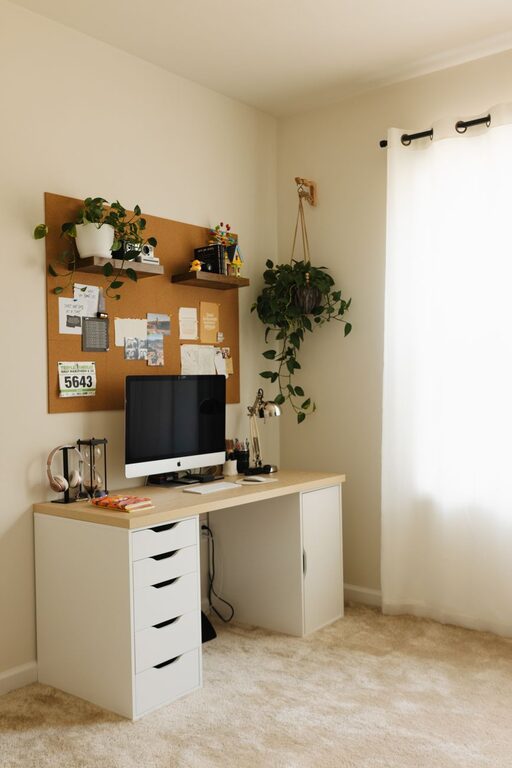
Creating a home workspace that is both cozy and functional can greatly improve your productivity and well-being, especially as more people spend time working remotely. A well-designed workspace helps you stay focused while feeling comfortable, making the workday more enjoyable and less stressful. In this post, we’ll walk through practical tips to help you set up your ideal home office that suits your needs and style.
Why a Cozy and Functional Workspace Matters
Working from home offers flexibility but can blur the lines between personal and professional life. A well-crafted workspace separates work from relaxation, helping you maintain focus and balance. Comfort reduces physical strain, and organization minimizes distractions, resulting in a productive environment.
Choose the Right Location
Selecting the best spot in your home for your workspace is the first step.
– Natural Light: Pick a space near a window to enjoy natural daylight. Natural light can improve mood and reduce eye strain.
– Quiet Area: Choose a quiet corner or room where interruptions are minimal.
– Ventilation: Good airflow keeps the space fresh and comfortable.
– Space Availability: Ensure there is enough room for your desk, chair, and any equipment without feeling cramped.
Invest in Comfortable Furniture
Ergonomics matters for both comfort and health.
Desk
– Size and Shape: Pick a desk that fits your available space and accommodates your work essentials like a computer, notebooks, and peripherals.
– Adjustability: Consider adjustable desks or sit-stand desks to vary your posture during the day.
Chair
– Ergonomic Design: Choose a chair that supports good posture, especially for your lower back.
– Adjustable Height and Armrests: This allows you to customize fit based on your body and desk height.
– Comfortable Cushioning: Long working hours require well-padded seating to avoid discomfort.
Organize Efficiently
A clutter-free workspace helps maintain focus.
– Storage Solutions: Use shelves, drawers, or baskets to organize papers, tools, and personal items.
– Cable Management: Keep cords tidy with clips, sleeves, or under-desk trays.
– Desk Essentials: Arrange frequently used items within arm’s reach to reduce unnecessary movement.
– Digital Organization: Maintain desktop folders and a clear screen to avoid digital clutter.
Personalize Your Space
Adding personal touches can make the area feel welcoming and motivating.
– Decor: Use calming colors, artwork, or inspirational quotes.
– Plants: Small indoor plants improve air quality and add a refreshing green touch.
– Lighting: Besides natural light, use desk lamps with adjustable brightness for late hours.
– Comfort Accessories: Consider a cozy blanket, cushion, or footrest for extra comfort.
Maintain Good Lighting
Proper lighting reduces eye strain and keeps you alert.
– Use a combination of ambient, task, and natural lighting.
– Avoid harsh overhead lights that cause glare on screens.
– Position your monitor perpendicular to windows to reduce reflections.
Minimize Distractions
Try to make your workspace a “work-only” zone.
– Inform family members or roommates about your working hours.
– Use noise-canceling headphones or white noise machines if needed.
– Keep personal devices away unless required for work.
Incorporate Break Areas
Even in a small home, having a distinct spot to rest is helpful.
– Use a comfortable chair or corner for quick breaks.
– Stand up and stretch regularly to keep circulation flowing.
– Take advantage of natural light and views outside to refresh your mind.
Keep It Clean and Tidy Daily
Regular cleaning helps maintain a comfortable atmosphere.
– Wipe down surfaces and electronic devices to keep dust and germs away.
– Organize papers and supplies at the end of each day.
– Empty trash bins frequently to avoid clutter buildup.
Use Technology Wisely
Equip your workspace with helpful technology to boost efficiency.
– Invest in quality headphones, an external keyboard, and mouse for comfort.
– Use multiple monitors if your work involves multitasking.
– Keep chargers and cables organized to avoid frustration.
Flexibility and Adaptability
Your workspace should evolve with your needs.
– Rearrange furniture or refresh decor if you start feeling uninspired.
– Try different layouts to find what best supports your workflow.
– Incorporate new tools or storage as your tasks change.
—
Creating the perfect home workspace is a combination of comfort, organization, and personalization. By thoughtfully designing your area, you can foster both productivity and relaxation, making working from home a truly positive experience. Remember, the best workspace is one that fits your unique style and needs. Take the time to adjust and improve your setup over time for the best results.